


Offset vs Cursor Pagination: Why Page 25,000 Is Slow and How Keyset Pagination Fixes It
Why LIMIT/OFFSET gets slower the deeper you page and shows duplicates when data changes, how keyset (cursor) pagination avoids both, and how to build a cursor API, with PostgreSQL plans and runnable examples.
Almost every list endpoint starts the same way: LIMIT 20 OFFSET (page - 1) * 20. It is easy to write and it works fine in development. Then the table grows, someone scrolls far down a feed or a script exports everything page by page, and the deep pages become slow. Meanwhile users notice the same post twice in their infinite scroll.
Both problems come from the same place: OFFSET counts rows instead of remembering where you were. This post shows why, measures it on a million-row PostgreSQL table, and walks through keyset pagination (usually exposed as cursor pagination in APIs), which fixes both. The SQL results below come from PostgreSQL 16.15 on a throwaway local database, and the JavaScript examples were run with Node 22.
The two approaches in one minute
Short answer: offset pagination says "skip N rows, then take 20". Keyset pagination says "take 20 rows that come after the last row I saw". The second one can jump straight to the right place in an index; the first one has to count its way there.
The test table has one million posts. Several posts share the same created_at (three per minute), which is realistic and matters later:
CREATE TABLE posts (
  id bigserial PRIMARY KEY,
  created_at timestamptz NOT NULL,
  title text NOT NULL
);
CREATE INDEX posts_created_id ON posts (created_at DESC, id DESC);
Offset pagination, page 25,001 of 20 rows:
SELECT id, created_at, title FROM posts
ORDER BY created_at DESC, id DESC
LIMIT 20 OFFSET 500000;
Keyset pagination of the same page. The client sends back the created_at and id of the last row on the previous page, and the query asks for rows that sort after it:
SELECT id, created_at, title FROM posts
WHERE (created_at, id) < ('2026-04-26 17:47:00+00', 500001)
ORDER BY created_at DESC, id DESC
LIMIT 20;
Both returned the same 20 ids (500000 down to 499981) in my run. The difference is how much work it took to get them.
Why OFFSET gets slower the deeper you go
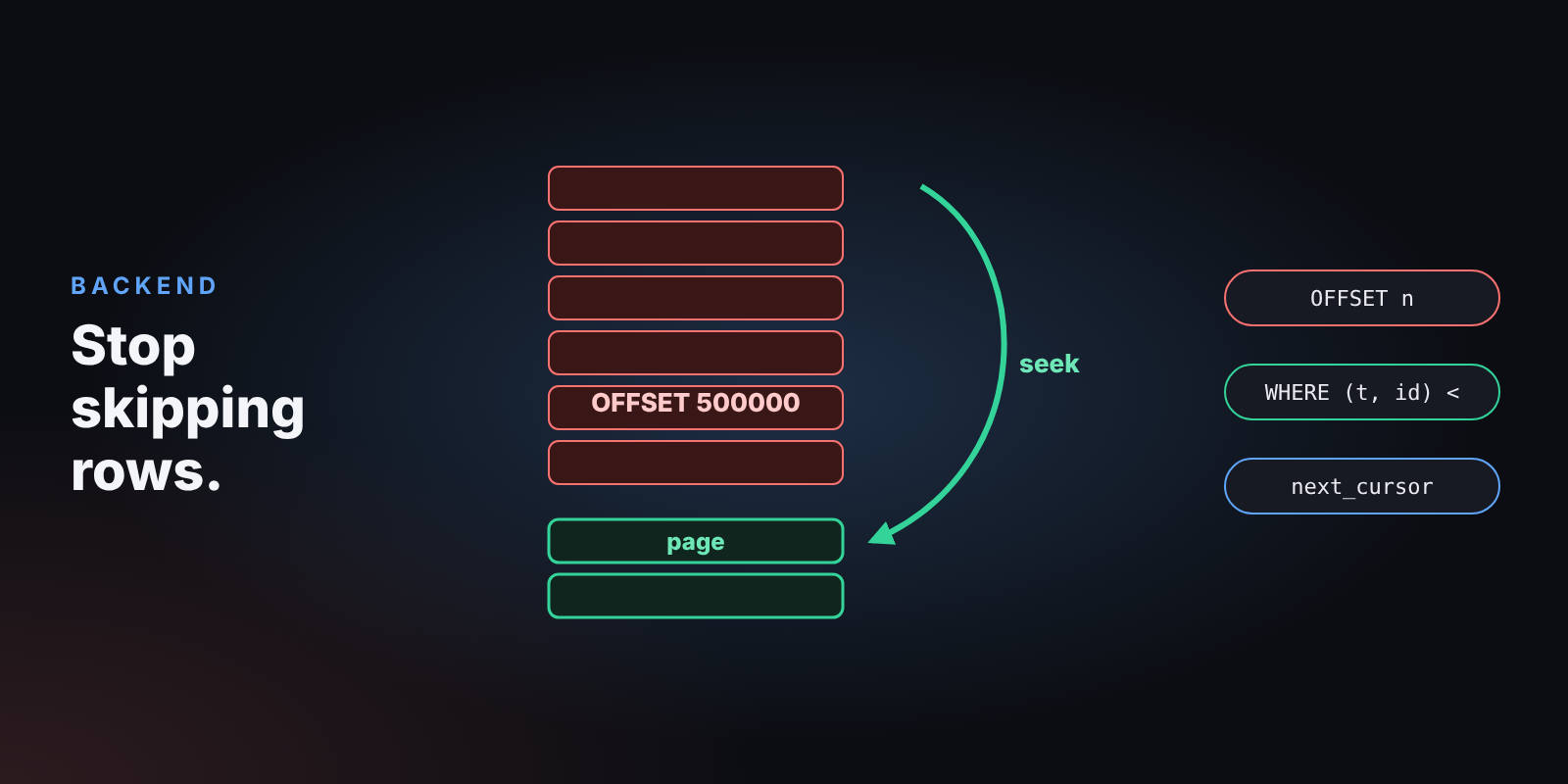
Short answer: the database cannot jump to "row 500,000" directly. It reads the first 500,000 rows in order and throws them away.
The PostgreSQL documentation says it plainly: "The rows skipped by an OFFSET clause still have to be computed inside the server; therefore a large OFFSET might be inefficient." EXPLAIN ANALYZE shows it. TIMING OFF and COSTS OFF hide the numbers that change between runs, so what is left is how many rows each step produced:
EXPLAIN (ANALYZE, TIMING OFF, SUMMARY OFF, COSTS OFF)
SELECT id, created_at, title FROM posts
ORDER BY created_at DESC, id DESC LIMIT 20 OFFSET 500000;
Output:
 Limit (actual rows=20 loops=1)
   ->  Index Scan using posts_created_id on posts (actual rows=500020 loops=1)
The index scan produced 500,020 rows so that Limit could return 20. The keyset version of the same page:
 Limit (actual rows=20 loops=1)
   ->  Index Scan using posts_created_id on posts (actual rows=20 loops=1)
         Index Cond: (ROW(created_at, id) < ROW('2026-04-26 17:47:00+00'::timestamp with time zone, 500001))
Twenty rows read, twenty returned. The Index Cond line shows the database used the cursor to position itself in the index before reading anything.
 LIMIT 20 OFFSET 500000 reads 500,020 index entries and returns 20, while the keyset query jumps to the cursor and reads 20
How that turns into time in my test environment (a small cloud container with the whole table in memory; median of five runs after one warm-up, measured with psql's \timing):
| Query (20 rows per page) | Median time |
|---|---|
OFFSET 10 | 1.2 ms |
OFFSET 100000 | 14.3 ms |
OFFSET 500000 | 66.2 ms |
OFFSET 900000 | 121.2 ms |
Keyset, same page as OFFSET 500000 | 1.5 ms |
The exact milliseconds will differ on your hardware, but the shape will not: offset cost grows in a straight line with the page number, and keyset cost stays flat. On a real server, with rows not all in memory and many users paging at once, the deep offset pages are also the ones that push useful data out of the cache.
The second problem: duplicates and missing rows
Short answer: offset pages are defined by position, so when rows are added or removed between two requests, every later row shifts. Users see some rows twice and never see others.
A feed sorted newest first is the classic case. The reader loads page 1, someone publishes a new post, and the reader asks for page 2. The new post pushed everything down one place, so "skip 3" now lands on a row the reader has already seen:
 A new post arrives after page 1; offset page 2 shows post 8 again, while keyset page 2 continues with 7, 6, 5
The same thing in code, including the opposite case where rows are deleted:
Output:
page 1: 10, 9, 8
after an insert, offset page 2: 8, 7, 6
after an insert, keyset page 2: 7, 6, 5
after two deletes, offset page 2: 5, 4, 3
after two deletes, keyset page 2: 7, 6, 5
After the insert, offset page 2 repeats post 8. After the deletes, offset page 2 jumps to 5, so posts 7 and 6 are never shown at all. Keyset pagination continues from "older than 8" in both cases, because it remembers a value, not a position.
This is why infinite-scroll feeds, activity logs and sync or export jobs should not use offsets. For a sync job, a skipped row is silent data loss.
The tie-breaker everyone forgets
Short answer: the cursor must identify exactly one row. Sorting by a timestamp alone is not enough when two rows can share a timestamp; add a unique column such as
idto both theORDER BYand the cursor.
If the cursor is only created_at, "older than the last timestamp I saw" skips any other row that has the same timestamp but did not fit on the previous page:
Output:
timestamp only: 6, 5, 2, 1 (4 of 6)
timestamp + id: 6, 5, 4, 3, 2, 1 (6 of 6)
With a timestamp-only cursor, posts 4 and 3 vanish because they share 10:01 with post 5, which ended page 2. Adding id as a tie-breaker makes the sort order unique, so every row is read exactly once. The PostgreSQL docs make the same point for LIMIT in general: "it is important to use an ORDER BY clause that constrains the result rows into a unique order. Otherwise you will get an unpredictable subset of the query's rows."
In SQL, the cleanest way to write "after this (created_at, id) pair" is a row value comparison: (created_at, id) < ($1, $2). It compares the timestamps first and only looks at id when they are equal, which is exactly the rule in the JavaScript above. Two conditions make it fast:
- An index whose columns and directions match the
ORDER BY. Here,(created_at DESC, id DESC)forORDER BY created_at DESC, id DESC. The plan above shows the index condition being used. - Every column sorted in the same direction. A row comparison works for "all descending" or "all ascending". For mixed directions (newest first, then by name A to Z) you have to spell it out with
OR:created_at < $1 OR (created_at = $1 AND name > $2), and check the plan to make sure the index is still used.
Building a cursor API
Clients should not have to know which columns you sort by. The usual design returns an opaque cursor: a string the client stores and sends back unchanged, which the server decodes into the last row's sort values.
// Run with: node cursor.js
// Turn the last row of a page into an opaque cursor string, and back.
function encodeCursor(row) {
  const json = JSON.stringify({ v: 1, createdAt: row.createdAt, id: row.id });
  return Buffer.from(json).toString("base64url");
}

function decodeCursor(cursor) {
  let data;
  try {
    data = JSON.parse(Buffer.from(cursor, "base64url").toString("utf8"));
  } catch {
    throw new Error("invalid cursor");
  }
  if (data.v !== 1 || typeof data.createdAt !== "string" || !Number.isInteger(data.id)) {
    throw new Error("invalid cursor");
  }
  return { createdAt: data.createdAt, id: data.id };
}

const lastRow = { id: 500001, createdAt: "2026-04-26T17:47:00Z", title: "Post 500001" };
const cursor = encodeCursor(lastRow);
console.log("next_cursor:", cursor);
console.log("decoded:", decodeCursor(cursor));

for (const bad of ["not-a-cursor", encodeCursor({ createdAt: 5, id: "x" })]) {
  try {
    decodeCursor(bad);
  } catch (err) {
    console.log(`rejected ${bad.slice(0, 12)}...: ${err.message}`);
  }
}
Output:
next_cursor: eyJ2IjoxLCJjcmVhdGVkQXQiOiIyMDI2LTA0LTI2VDE3OjQ3OjAwWiIsImlkIjo1MDAwMDF9
decoded: { createdAt: '2026-04-26T17:47:00Z', id: 500001 }
rejected not-a-cursor...: invalid cursor
rejected eyJ2IjoxLCJj...: invalid cursor
A typical response then looks like:
{
  "data": [ ... 20 posts ... ],
  "next_cursor": "eyJ2IjoxLCJjcmVhdGVkQXQiOi...",
  "has_more": true
}
Things to get right:
- Fetch one extra row to compute
has_more. Ask the database forLIMIT 21, return 20, and sethas_moreto whether the 21st row existed. That avoids a separate count query. - Validate the decoded cursor like any other input. It came from the client, so check its shape and types, and use it only as query parameters, never by pasting it into SQL. Base64 is an encoding, not encryption: anyone can read a cursor. If its contents are sensitive or you do not want clients to build their own, sign it with an HMAC.
- Version the cursor. The
v: 1field lets you change the sort columns later and reject or translate old cursors. - Tie the cursor to the query. A cursor from a list filtered by
status=openshould not be reused withstatus=closed. Either include the filters in the cursor or reject a mismatch.
Real APIs work this way. Stripe's list endpoints use "cursor-based pagination through the starting_after and ending_before parameters", where each parameter is the ID of an object in the list, and every response includes has_more.
What you give up with keyset pagination
Keyset pagination is not free. Be ready to explain the trade-offs:
- No jumping to an arbitrary page. You can go to the next page and, with a reversed query, the previous one, but not straight to page 400. For most feeds and APIs that is fine; "page 400" is rarely what a person wants. Search results and admin tables with page numbers are where offset is still common.
- No cheap total count. Showing "page 3 of 12,481" needs a
COUNT(*), which is expensive on large tables whichever method you use. Many products show "more results" instead, or an estimate. - The sort must be stable and indexed. Sorting by a column that changes (like a score that updates every minute) can still move rows between pages. Keyset gives consistent pages for stable sort keys.
- A bit more code. The cursor encoding, the tie-breaker and the reversed query for "previous page" all need care.
A reasonable rule: use offset for small, bounded lists where people want page numbers, and keyset for feeds, infinite scroll, public APIs, exports and anything that can grow without limit.
Questions interviewers ask about pagination
Why is a large OFFSET slow even with an index?
Because the index lets the database read rows in order, but not skip ahead by count. It walks through every skipped entry, so the cost grows with the offset. The EXPLAIN ANALYZE above showed 500,020 rows read for 20 returned.
Why do users see duplicates in an offset-paginated feed? Because pages are positions. An insert above the reader's position shifts rows down, so the next page starts on a row they already saw; a delete shifts rows up and some are skipped.
Why add id to the cursor if you sort by time?
To make the sort order unique. Without a tie-breaker, rows with the same timestamp can be skipped or repeated at a page boundary.
How do you implement "previous page" with cursors?
Flip the comparison and the sort ((created_at, id) > cursor ORDER BY created_at ASC, id ASC), take the page, and reverse it in your code before returning it.
How would you paginate a sync job that copies a whole table?
Keyset on the primary key: WHERE id > $last ORDER BY id LIMIT 1000. It is fast on every batch, cannot skip rows that already existed when it started, and can resume from the last id after a crash.
Cheat sheet
Offset (LIMIT … OFFSET n) | Keyset / cursor (WHERE (sort, id) < cursor) | |
|---|---|---|
| Cost of a deep page | Grows with n (reads every skipped row) | Flat (index seek, then read the page) |
| Rows added or removed between requests | Duplicates or missing rows | Continues from the last row seen |
| Jump to page 400 | Yes | No, next and previous only |
| Total count | Needs COUNT(*) | Needs COUNT(*) |
| Requirements | A unique ORDER BY | A unique ORDER BY, a matching index, a cursor |
| Good fit | Small admin tables, numbered pages | Feeds, infinite scroll, public APIs, exports, sync jobs |
Enjoyed this read?
More from Arvind Nishad
- Postgres Composite Indexes: Column Order, Covering Indexes and Skip Scan, Measured on 5 Million Rows
- Cumulative Layout Shift (CLS), Measured: 15 Test Pages That Show What Moves the Score
- Vector Search for RAG: Exact, HNSW and IVF Measured on a Million Vectors
- TypeScript Interview Follow-Up Questions, Answered With TypeScript 7
Related stories
TypeScript Interview Follow-Up Questions, Answered With TypeScript 7
Eight follow-ups interviewers ask after "do you know TypeScript?", from unknown vs any to satisfies, exhaustive checks and erased types, with every compiler error checked against tsc 7.0.2.
Transaction Isolation Levels, Shown With Two Real PostgreSQL Sessions
What Read Committed, Repeatable Read and Serializable actually protect you from, demonstrated with two concurrent PostgreSQL sessions. Covers lost updates, write skew, the 40001 error and how to retry it.
Vector Search for RAG: Exact, HNSW and IVF Measured on a Million Vectors
How vector indexes trade accuracy for speed, measured with Faiss on up to a million 384-dimension vectors. Covers recall@k, the efSearch and nprobe knobs, why recall drops as data grows, and why filtering can silently return 1 result out of 10.
Responses (0)
Sign in to join the discussion.